Welcome to Issue 22 of WPBeginner Spotlight! March was full of exciting developments in the WordPress industry.
In this issue, we are celebrating a massive decade-long milestone for one of our favorite WordPress form builders and exploring exciting new AI tools designed to put your WooCommerce promotions and course creation on autopilot. We’re also looking at major updates to how you can manage site staging and security.
Let’s dive into all the latest WordPress news, plugin updates, and ecosystem developments you need to know about.
WPBeginner Spotlight brings you a monthly roundup of the most important WordPress news, updates, and community happenings. 📅✨
Got something to share? Whether it’s a new product launch, a significant update, or an exciting event, reach out to us through our contact form, and your news could be featured in the next edition!
WPForms Celebrates 10 Year Anniversary and Releases a Universal PayPal Integration
WPForms is officially celebrating their 10th anniversary!
This is a monumental milestone for the most popular WordPress form builder, which is trusted by over 6 million websites.

WPForms was launched in 2016 to make it easier for users to add a contact form to their WordPress website. What started as a contact form plugin has now become an AI-powered solution that works with all the popular tools a website owner may need.
Over the last decade, WPForms has consistently led the way in making form creation easy, accessible, and powerful for non-techy users and professionals alike.
Last year alone, they released major new features each month including addons for Quizzes, PDFs, Camera and Map fields, and integrations for Google Drive, Google Calendar, Airtable, Make.com, n8n, and more.
To celebrate this occasion, WPForms is offering 60% discount (for a limited time).
PayPal Integration for All WPForms Users
To make this occasion even more special, the WPForms team has also released a highly requested feature: a Universal PayPal integration available to all users.
Whether you are using the premium version or the free WPForms Lite, you can now seamlessly connect your forms to PayPal to accept payments, donations, and online orders.
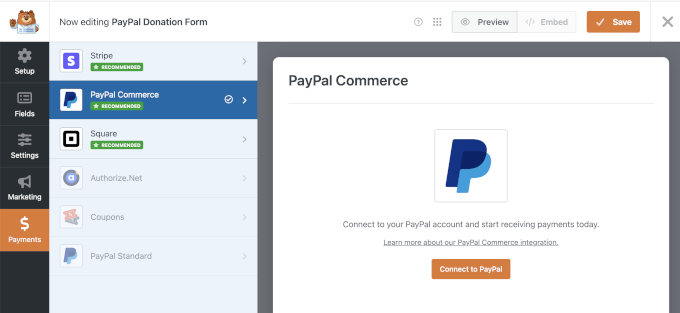
This update completely democratizes online payments for the WordPress community. It means anyone can start monetizing their website without any complicated eCommerce addon.
Monitor Your WordPress Site with New Activity Log Plugin by Duplicator
The Duplicator team has officially launched Activity Log, a brand-new plugin designed to give site owners a complete audit trail of every action taken on their WordPress website.
This tool addresses a significant gap in default WordPress functionality by tracking who logged in, who changed settings, and exactly when specific content was modified.
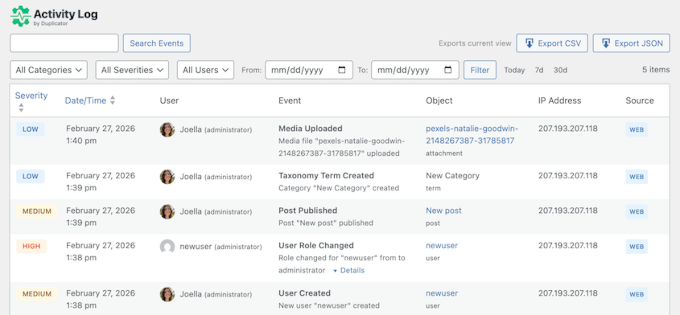
Activity Log tracks over 60 different types of events across categories such as user sessions, content edits, plugin updates, and theme changes.
Each event is tagged with one of four severity levels—Critical, High, Medium, or Low—allowing administrators to instantly distinguish routine tasks from potential security threats like failed login attempts.
The plugin also provides a searchable timeline that can be filtered by date, user, event type, or IP address.
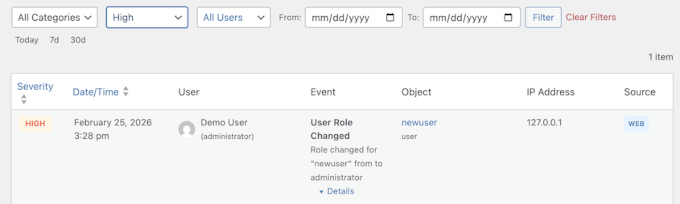
Beyond standard WordPress logging, Activity Log monitors specific actions that other plugins often miss, such as featured image changes and custom field updates.
It also tracks critical background adjustments, including permalink structure shifts or admin email changes. This makes sure that significant configuration shifts never go unnoticed.
Users can also set up a flexible email notification system to receive real-time alerts for high-severity events. That way, they can respond to critical issues immediately without manually checking the dashboard.
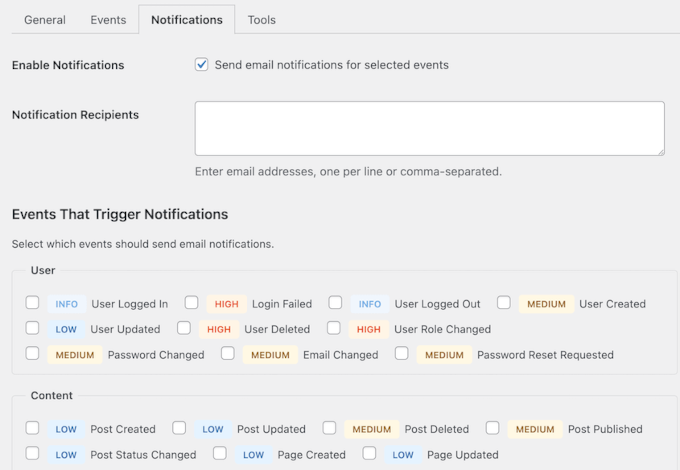
For advanced users and developers, Activity Log includes full WP-CLI support for managing logs via the command line.
This allows for exporting data in CSV or JSON formats, as well as automating log management across a large portfolio of websites.
You can find out more about Activity Log here.
WP Packages Launches as an Independent, Community-Funded Alternative for Developers
The WordPress developer community has officially seen the launch of WP Packages, which is a fully independent and open-source Composer repository.
💡What is Composer?
When developers build a WordPress site, they often use many different “parts” like plugins, themes, or specific sets of code (called libraries). Instead of the developer manually downloading each part, checking if it’s the right version, and making sure all those parts work together, Composer does it automatically
Developed by Ben Word and the Roots team (the group behind Bedrock and Sage) this project provides a modern way for professional developers to manage WordPress plugins and themes as PHP dependencies.
WP Packages serves as an open-source replacement for WPackagist by offering every free plugin and theme from the WordPress.org directory through a transparent build process.
By being community-funded via GitHub Sponsors, the project remains community driven and focuses entirely on serving the technical needs of the developer ecosystem.
Plus, transitioning to the new system is designed to be straightforward, with a dedicated migration script available for developers to update their existing projects.
[New] WPVibe by SeedProd – Manage Your WordPress Site Directly from Claude Code, ChatGPT, or Cursor
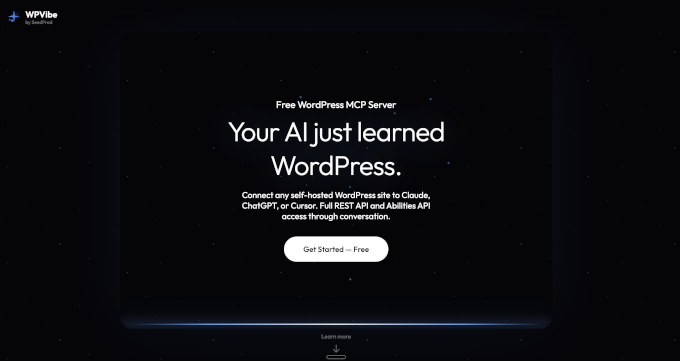
WPVibe by SeedProd has launched a new way to control your website using conversational AI.
It lets you connect your self-hosted WordPress site to tools like Claude, ChatGPT, or Cursor. Instead of digging through complicated WordPress menus and settings, you can now perform complex admin tasks just by typing out what you want to do.
While other similar tools focus on local developer environments, WPVibe provides remote access. This enables you to manage your site from any AI web interface while keeping your data on your own hosting.
This ultimate “AI Site Assistant” simplifies management with several key features:
- Instant Content Control: Create posts, update pages, and manage comments or categories using natural language.
- Site Intelligence: Ask your AI to check active themes, installed plugins, and overall site health in seconds.
- Plugin Integration: Run specific tasks within tools like WPForms and AIOSEO via the new “Abilities API.”
- Multi-Step Automation: Use “Code Mode” to chain operations together, such as auditing a page and then updating its content in one go.
How Does it Work?
WPVIbe offers an MCP server (a small program) that acts a bridge between your AI tool like Claude or ChatGPT and your data like your website, files, databases, etc.
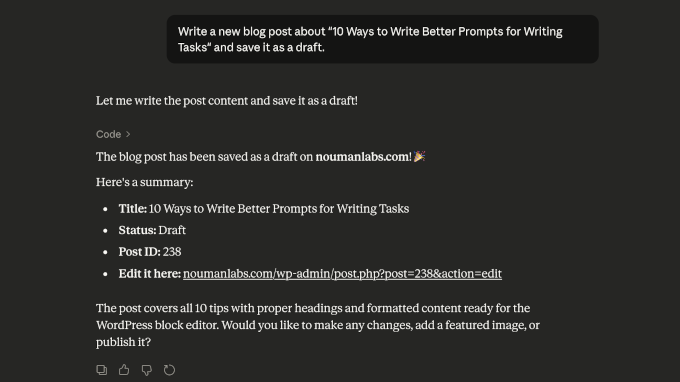
This allows your AI to access and understand your WordPress site in a safe and secure manner, allowing you to work on your site directly by typing simple prompts.
Security is built-in to keep your data safe. WPVibe uses AES-256 encryption for credentials, and ensures that all new content defaults to “Draft” mode for your review. It also protects against accidental data loss by moving deleted items to the trash for 30 days rather than permanent removal.
Setup takes less than 60 seconds with a simple server URL and a one-click magic link.
WPCode Reaches 3M Installs, Debuts New Visual CSS Picker and Custom Event Tracking
WPCode has hit an absolutely massive milestone: 3 million active installs! It continues to be the best and safest way to add custom code snippets, tracking pixels, and PHP scripts to WordPress without editing your theme files.
To celebrate this phenomenal growth, the WPCode team has debuted a game-changing new feature: the Visual CSS Picker.
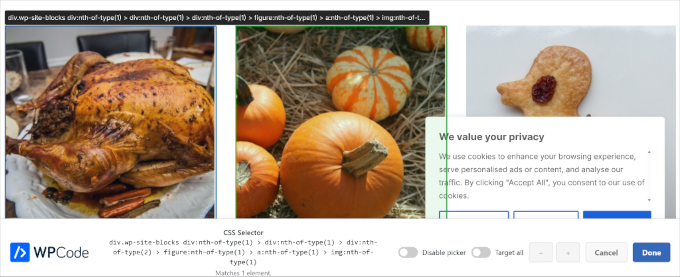
This incredibly intuitive tool allows you to point, click, and customize the design of any element on your website visually, without needing to inspect elements or guess CSS classes.
This is a big time-saver that enables beginners to safely tweak their website’s design while offering advanced users a blazingly fast workflow. It completely removes the intimidation factor of customizing your theme’s appearance, making styling your site easier than ever before.
Plus, WPCode has released custom event tracking for their Conversion Pixels addon. It lets you easily track specific user actions on your WordPress site—like video views, link clicks, and scroll depth—and send that data to your advertising platforms.
This is a huge deal for beginners because it allows you to see exactly what visitors are doing on your site and optimize your marketing campaigns. All without having to write a single line of code or hire an expensive developer.
MonsterInsights Unlocks Smarter Data Visuals and Flexible Report Exports
MonsterInsights, the #1 Google Analytics plugin for WordPress, has launched a major redesign of its reporting dashboard.
This new update makes it easier for site owners to visualize complex data without switching tabs.
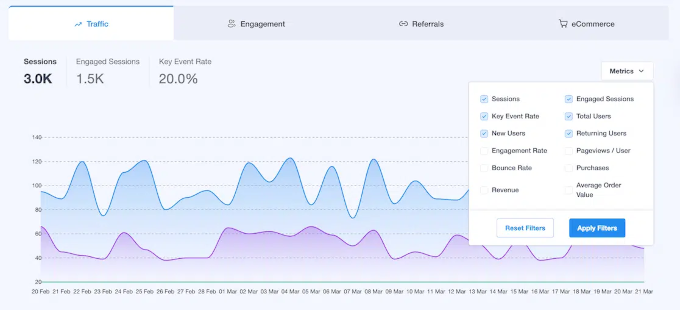
The reimagined Overview tab introduces several key features for better site intelligence:
- Multi-Metric Overlays: Compare different metrics—like Revenue and Pageviews—on a single color-coded graph to spot trends instantly.
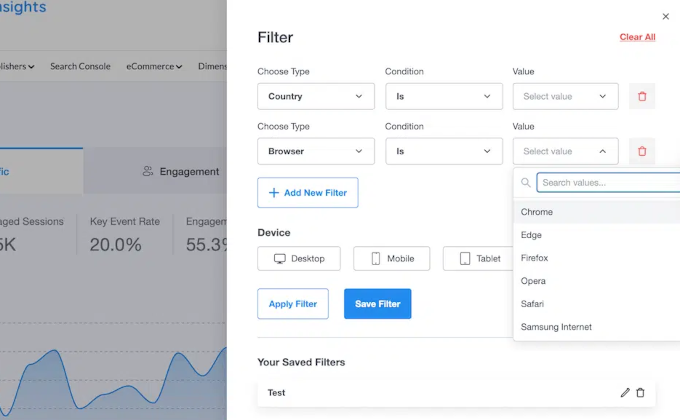
- Advanced Filtering: Use a new slide-out panel to layer and save filters for specific countries, browsers, or device types.
- Enhanced Campaign Tables: Slice your marketing data by Source, Medium, or Content using new built-in tabbed navigation.
Beyond visuals, MonsterInsights also lets you export every report as a CSV or Excel file. This is a significant upgrade over static PDFs because it allows agency owners and marketers to run custom formulas in Google Sheets or feed raw data into AI tools like ChatGPT for automated reporting.
To keep your data organized, a new Export Queue has also been added under the Tools menu. This central hub lets you track and download all your recent exports in one place so that your analytics are always ready for clients or team presentations.
Overall, this new update makes MonsterInsights reporting a lot more easier and manageable. It enables business owners, agencies, and marketers to quickly find the data they need to grow their businesses.
my.WordPress.net: A Permanent, Private WordPress Environment That Runs in Your Browser
WordPress has introduced my.WordPress.net, a new platform that allows you to run a complete WordPress environment entirely and persistently within your browser.
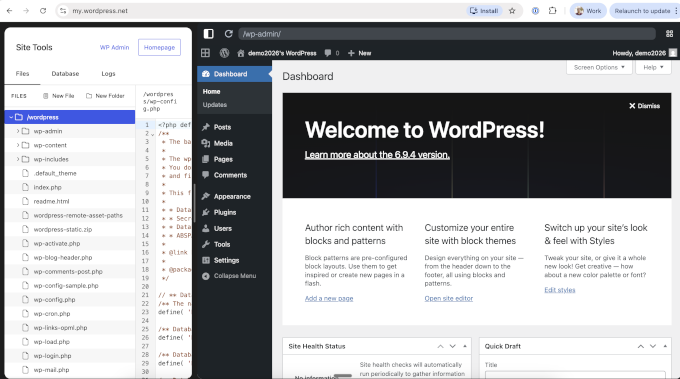
Built on WordPress Playground technology, this initiative removes traditional barriers like hosting plans, domain registrations, and sign-up forms. It’s in the spirit of the “five-minute install” for a new generation of creators.
This “Zero Barrier” approach reframes WordPress as a personal environment where exploration matters more than public outcomes. It serves as a safe space for learning, where users can explore plugins and themes knowing that mistakes are easily recoverable and entirely private.
Plus, unlike temporary demos, my.WordPress.net is designed to be a permanent and personal workspace.
Key features of this browser-based environment include:
- Total Privacy: Sites are private by default and not accessible from the public internet. This makes them ideal for drafting ideas, collecting research, or experimenting without pressure.
- Local Data Storage: All data stays within the user’s browser and is not uploaded to external servers. This provides a higher level of digital ownership.
- One-Click App Catalog: The platform includes pre-configured “apps” for personal use, such as a Private CRM for managing contacts and a Personal RSS Reader for following content without algorithms.
- AI Integration: An AI assistant can safely modify the environment. This helps users customize plugins, create new blocks, or interact with stored data as a personal knowledge base.
Important: Users should be aware that initial storage starts at roughly 100 MB and is tied to the specific device used for installation. Because the data is stored locally in the browser, it is recommended that users download regular backups to ensure their work is preserved across different sessions or devices.
Duplicator Launches One-Click Staging and Remote Cloud Restores
In other exciting news from the Duplicator team, their popular WordPress backup and migration plugin has introduced a major update designed to eliminate the risks of testing changes on live websites.
The new version features a true “one-click” staging system. It allows site owners to create a perfect, isolated copy of their website for testing plugins, themes, or code changes without affecting the live site.
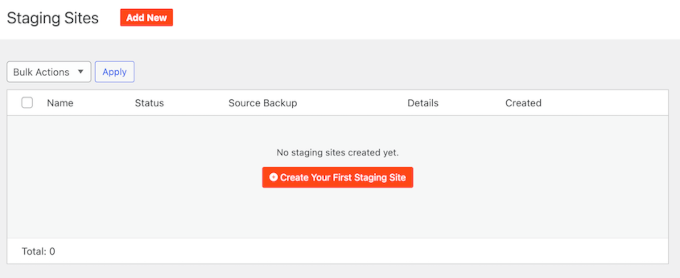
The staging environment is built to be a safe “sandbox” that automatically applies several critical protection measures:
- Search Engine Blocking: Staging sites are automatically hidden from Google and other search engines to prevent duplicate content issues.
- Email Disabling: All outgoing emails are suppressed so that test actions do not accidentally reach real customers.
- Visual Cues: The staging admin bar features a custom color scheme to ensure you always know whether you are working on the live or test environment.
- Database Isolation: Sites use unique database prefixes and obfuscated URLs to remain completely separate from the live environment.
In addition to staging, the update introduces “Remote Cloud Restores,” which is a powerful disaster recovery tool.
This feature allows you to restore your website directly from Duplicator Cloud even if your server is completely inaccessible or your WordPress dashboard is down.
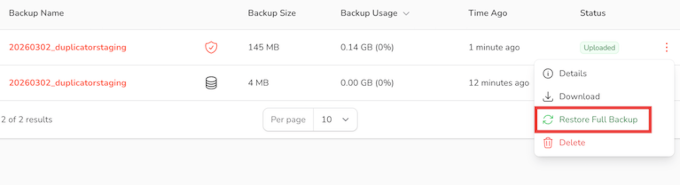
By configuring a recovery connector with your FTP/SFTP credentials, you can initiate a full-site restoration from any device at any time.
This ensures that even if a host suffers a catastrophic failure, you can get your site back online by simply selecting the latest backup from your cloud storage and launching the restoration wizard.
For agencies and developers, the new Duplicator Cloud dashboard serves as a centralized control center. You can now monitor the backup status of hundreds of websites from a single view and perform centralized restorations without jumping between different WordPress logins. This makes portfolio management significantly more efficient.
Thrive Suite Update Simplifies Quiz Data and Lead Form Creation
Thrive Themes has released a major update for Thrive Suite, including upgrades to Thrive Quiz Builder, Thrive Leads, and Thrive Architect.
This update focuses on giving site owners better access to their data and reducing the time spent on repetitive manual tasks.
A major highlight of this release is how much easier it is to move and manage your quiz data. Thrive Quiz Builder now allows you to export all of your quiz results as a CSV file with a single click.
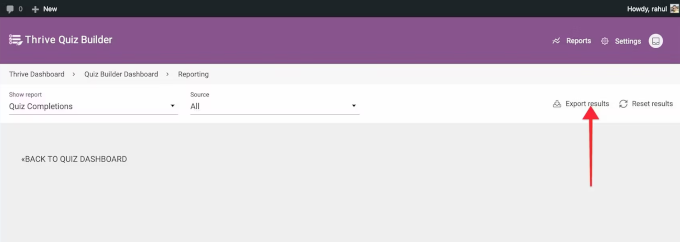
This ensures that valuable lead insights—including names, emails, category scores, and individual answers—can be easily moved into Excel, Google Sheets, or other marketing automation tools for deeper analysis and lead segmentation.
The update also brings several key improvements to the user and builder experience:
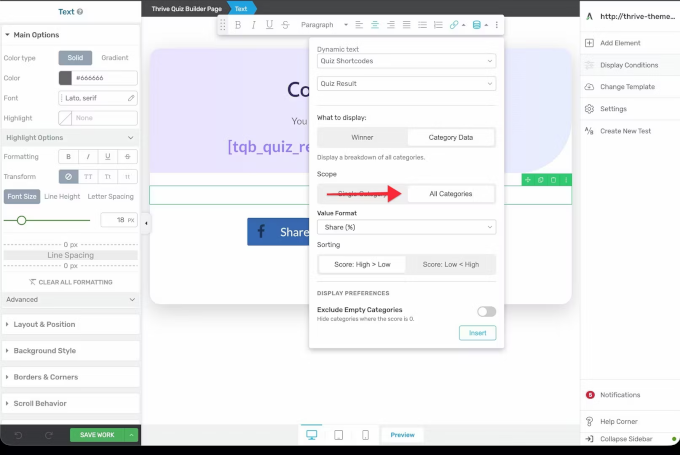
- Detailed Quiz Results: You can now display a full category breakdown on results pages using simple shortcodes. This informs participants exactly how they scored across different topics instead of just showing a single “winning” category.
- One-Click Lead Form Duplication: Thrive Leads now features a duplicate icon that instantly copies entire Lead Groups or forms, including all design settings, display rules, triggers, and integrations.
- Expandable Architect Sidebar: To improve navigation speed, the Thrive Architect sidebar can now be expanded to show text labels alongside icons. This makes features easier to find for both new and experienced users.
- Smarter Workspace Management: The new sidebar automatically collapses when you open specific panels to maximize your editing canvas, then returns to your preferred view once you finish your task.
For marketing teams, the one-click duplication feature significantly speeds up A/B testing and seasonal campaign setups by allowing proven designs to be reused and tweaked in minutes.
Additionally, the new CSV export respects GDPR-safe anonymization settings to make sure that your data collection remains compliant even when moving it between different platforms.
Overall, these improvements reflect an ongoing effort to help entrepreneurs make smarter, data-driven decisions without burning time on technical hurdles.
Build Donor Trust Instantly with Charitable’s New Donations Feed
Charitable has launched a brand-new Donations Feed feature in version 1.8.13, which provides nonprofits with a powerful way to display social proof and build momentum.
This new block and shortcode allow organizations to showcase a live, customizable feed of real-time donations directly on any page of their website without needing a developer.
It’s designed to turn silent donation pages into active communities by highlighting real names, amounts, and donor comments. By showing that others are already contributing, nonprofits can reduce donor uncertainty and give new visitors a clear reason to trust their mission.
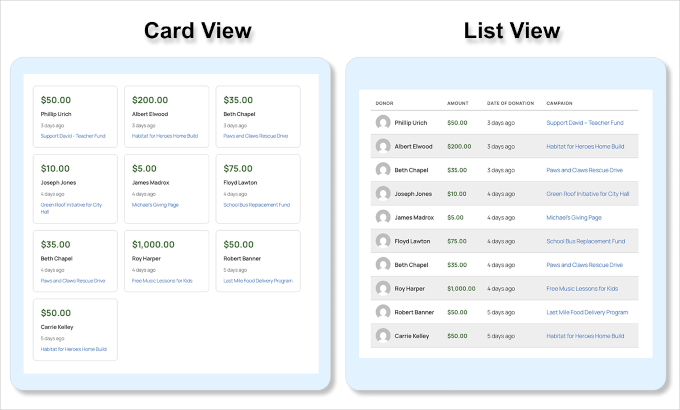
The tool offers extensive control over how giving history is presented to the public:
- Flexible Display Styles: Choose between a clean list view or a card view, both of which are fully customizable to match your organization’s branding.
- Live Momentum: Enable live polling so the feed refreshes automatically as new donations arrive. This can create a sense of urgency during giving days or active campaigns.
- Granular Filtering: Filter the feed by specific campaigns, minimum donation amounts, or date ranges to tell the most effective story for each page.
- Donor Insights: Display donor locations and comments to show the global reach of your cause and provide personal testimonials from supporters.
For nonprofit organizations looking to maximize social proof, the Donations Feed can be paired with DonorTrust, a platform that displays real-time popup notifications of verified donations.
Automate Your WooCommerce Promotions with AI-Powered Coupons
Advanced Coupons has announced a major integration with StoreAgent, which introduces an AI coupon generator designed to speed up the creation of WooCommerce promotions.
This new tool allows store owners to skip the manual configuration of complex and time-consuming coupon settings. Instead, they simply need to describe their promotional ideas in plain language.
No more worrying about accidentally breaking a coupon rule or messing up minimum spend requirements.
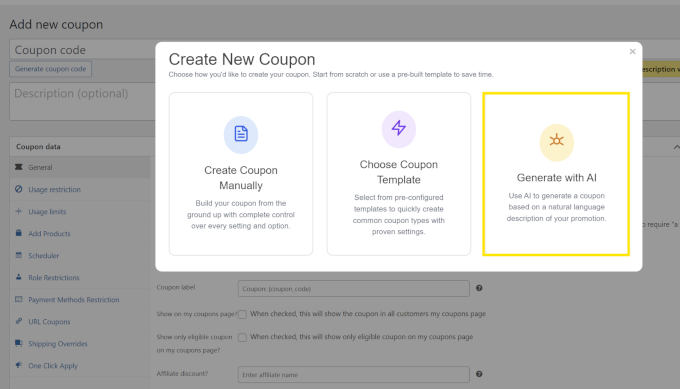
The AI assistant ensures total accuracy by automatically configuring several key areas based on your simple description:
- Discount Logic: The AI sets the discount type and amount, such as “20% off” or “$10 fixed discount,” based on your description.
- Cart Conditions: It automatically applies rules like minimum spend requirements, ensuring that the coupon only works when specific criteria are met.
- Usage Restrictions: The generator includes basic limitations to prevent coupons from being applied to the wrong products or customer groups.
- Automatic Naming: Users can manually name their codes or use the “Generate” button to create unique, random coupon codes instantly.
To use this feature, site owners need to have both the Advanced Coupons and StoreAgent plugins installed and activated.
MemberPress Unveils AI Course Generator to Build Full Curriculums via Chat
MemberPress has launched a powerful new AI Course Generator that’s designed to help online course creators transition from a blank page to a fully structured course in just minutes.
This new addon allows users to describe their course topic, audience, and goals through a simple chat interface and watch as sections, lessons, and learning objectives are generated in real time.
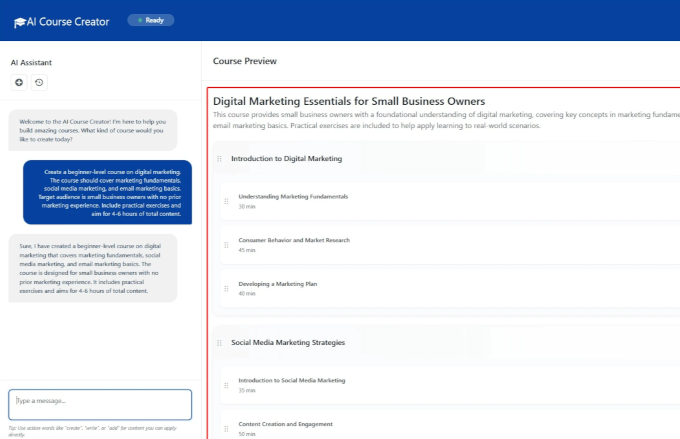
The tool uses a two-panel interface where users can chat with the AI on the left while a live preview of the course structure updates on the right.
To flesh out the actual course material, MemberPress has introduced two supporting AI features:
- AI Lesson Assistant: This tool turns outlines into full lessons based on the title and course context. It can also expand existing drafts, simplify complex language, or add practical examples to make content more digestible.
- AI Quiz Builder: The assistant reads your actual lesson content to generate relevant assessment questions. It supports multiple-choice, true/false, and short-answer formats to ensure students have understood the material.
Plus, site owners remain in total control of the final product, as every AI-generated element is fully editable.
The AI Course Generator is available for MemberPress Launch, Growth, and Scale plans and operates on a simple credit system.
In Other News
- RewardsWP has introduced a brilliant new Birthday Rewards feature that allows Pro users to automate personalized point bonuses and emails for customer birthdays. By sending direct redemption links on a customer’s special day, businesses can build deeper loyalty and increase immediate purchases.
- AffiliateWP has launched advanced affiliate fraud prevention tools to keep your referral programs safe and secure. These new safeguards automatically detect and block suspicious activities to make sure you only pay out commissions for legitimate, high-quality sales.
- WooCommerce 10.6.1 is now available as a maintenance release to resolve critical bugs, including attribute validation issues in the Add to Cart block. This update also improves the merchant experience by making sure that newly installed payment gateways are given priority over offline methods in your WooCommerce settings.

Fix WordPress Email Delivery with WP Mail SMTP
Fix your WordPress email delivery issues by routing emails through a trusted SMTP provider. WP Mail SMTP ensures your contact form notifications and reset password emails actually reach the inbox instead of the spam folder.
- Formidable Forms has launched a secure Virtual Fields feature that keeps your sensitive data locked down securely on your server. This stops tech-savvy visitors from right-clicking your page to snoop for hidden prices, internal codes, or cheat on your quiz answers.
- Easy Digital Downloads has introduced Conditional Email Tags, which give store owners the power to customize receipt content for different customer types within a single template. This automates personalized messaging for first-time buyers and guest users without requiring any manual list segmentation.
- WordPress 6.9.4 has been released to address several critical security vulnerabilities that were incompletely patched in previous updates. These include path traversal and authorization bypass flaws. Site administrators are strongly urged to update their installations immediately to protect against potential exploits.

WPConsent – Makes Privacy Compliance Made Simpler
Stay privacy-compliant by managing cookie consent and user data policies on your WordPress site. WPConsent automatically detects and blocks scripts from Google Analytics, Facebook Pixel, and others until users provide explicit consent.
- Wholesale Suite’s latest update adds support for displaying GTIN, UPC, EAN, and ISBN identifiers directly on wholesale order forms. This streamlines the verification process for B2B buyers and provides higher accuracy for stores managing complex product catalogs.
- Charitable now integrates with Uncanny Automator to help nonprofits reduce manual data entry by automating CRM updates and email list management for every donation. This lets organizations refocus their energy on their core mission instead of repetitive admin tasks.
New Tools & Plugins
- 🔥 Duplicator Activity Log: A powerful new tracking tool that monitors user actions and site changes. It makes it incredibly easy to troubleshoot issues and secure your WordPress site.
- ✨WPVibe.ai: A new artificial intelligence platform designed to streamline website management workflows and improve the WordPress building experience.
- 📱MemberPress AppKit: Build your own AI app for your membership or online courses website (No coding required).
- 📦 WP Packages: A new open-source tool designed to help developers easily manage and install free WordPress plugins and themes when building custom websites.
- 🤖 AI Coupon Generator: A massive time-saver for WooCommerce store owners. Just type out the kind of sale you want to run, and this AI tool automatically sets up all the complicated discount rules and conditions for your coupons.
- 🌐 my.WordPress.net: A free, private WordPress site that runs completely inside your web browser. You don’t need to buy web hosting or a domain name, making it a perfect, risk-free place to practice using WordPress, build a personal project, or test out new plugins.
That concludes this edition of the WPBeginner Spotlight! We hope this monthly roundup helped you stay informed about the latest developments and innovations within the WordPress community.
Do you have an upcoming product launch, a major feature update, or an interesting project that deserves attention? Please reach out and send us a message; your news could be featured in our next issue.
If you liked this article, then please subscribe to our YouTube Channel for WordPress video tutorials. You can also find us on Twitter and Facebook.
The post WPBeginner Spotlight 22: Big Milestones, Better Backups, and WordPress Community Tools first appeared on WPBeginner.